Profil Zaufany for foreigners: through a bank, in person and what to do without a PESEL
Updated 24.10.2026
You need Profil Zaufany both to log in to MOS and to sign your residence card application. The profile is free. It is valid for 3 years, and anyone aged 13 or over who has a PESEL number can get one, foreigners included.
Why you need Profil Zaufany for the application
You log in to MOS through login.gov.pl, and you sign the finished application electronically. A trusted signature (podpis zaufany) from Profil Zaufany or a qualified electronic signature will do, and without a signature MOS won't send the application. A MOS account itself can only be created through Profil Zaufany.
Only the foreigner can sign the application. A representative with power of attorney (pełnomocnik) cannot log in to your account or sign the application for you.
Option 1. Through your bank
With an account at a Polish bank, you can set up the profile online.
- Open pz.gov.pl and click “Załóż profil zaufany”.
- Choose “Bank lub inny dostawca”, then your bank.
- Log in to your internet banking and follow the instructions on the screen.
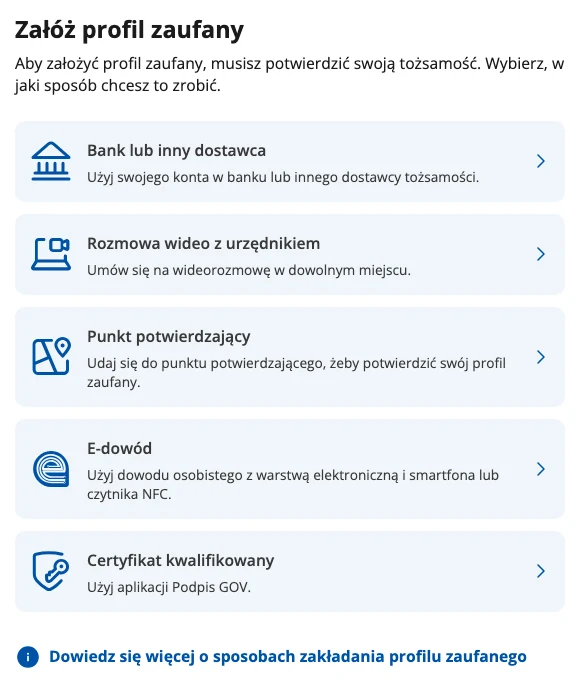
Not every bank offers this, and the list on the Profil Zaufany website is limited. Can't find your bank there? Go to option 2.
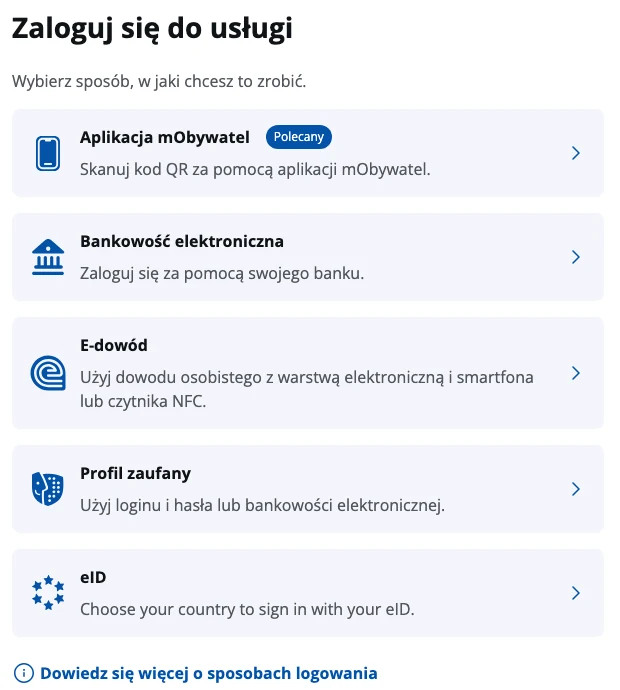
If you set up the profile through your bank, you also log in to MOS through your bank, which means picking your bank's logo on the login page and entering your internet banking details. You don't need a separate Profil Zaufany password for that.
Option 2. In person at a confirmation point
- Open pz.gov.pl, click “Załóż profil zaufany” and choose “Punkt potwierdzający”. When you register, you enter your PESEL number, choose a username and password and give a phone number for SMS codes, and the system creates a Profil Zaufany request by itself.
- Go to any confirmation point with your passport or residence card. Gmina offices, for example, have such points, and you can find addresses with the search on the Profil Zaufany website. Some points require an online appointment.
- An official checks your details against your document and the PESEL register and confirms the profile.
After that you log in to the profile with your username and password. Signatures are confirmed with an SMS code, but codes don't always reach foreign numbers. If the SMS doesn't arrive, call the Profil Zaufany helpline at +48 42 253 54 50 on working days from 7 am to 6 pm. They will verify your number.
Ukrainian citizens
Adult Ukrainian citizens with UKR status can confirm Profil Zaufany right at the gmina office when they are given a PESEL. Anyone who didn't do it then can confirm the profile later at any confirmation point in a gmina office or in another way on pz.gov.pl.
Video call and e-dowód won't work for foreigners
pz.gov.pl offers two more methods, a video call with an official and e-dowód. The video call requires a Polish passport or Polish ID card, and only Polish citizens have an e-dowód, so foreigners are left with the bank and the confirmation point.
If you have no PESEL
Without a PESEL number you can't get Profil Zaufany, and a MOS account is created precisely through Profil Zaufany, as UdSC and the voivodeship office in Lublin state. So get a PESEL first.
A foreigner gets a PESEL automatically when they register their address (zameldowanie) in Poland for more than 30 days. If you can't register your address but some office requires the number, apply for a PESEL in person at any gmina office. It's free. In the application you only need to state the law under which you need a PESEL.
You can sign the application with a qualified electronic signature (kwalifikowany podpis elektroniczny), but it doesn't replace a MOS account. The MOS login page has no separate button for it.
How long the profile is valid
Profil Zaufany is valid for 3 years from the day it is confirmed, and you can extend it online at any time by logging in to pz.gov.pl and choosing “Przedłuż ważność”. Even if it expires, your MOS account and data stay, and you can log in with this profile again once you extend it.
Don't share your login details
MOS rules forbid sharing your login.gov.pl details with anyone, even a representative, although someone may help you while you work in your own account. Ekspat works the same way. You log in to MOS yourself, and Ekspat never sees or stores your Profil Zaufany username and password.